What Happens When Your SSL Certificate Expires
TL;DR
When an SSL certificate expires, browsers stop trusting the connection and show a full-page “Your connection is not private” warning to every visitor. Bots stop crawling. APIs fail with TLS errors. Mobile apps that pin the certificate may refuse to connect at all. The damage to revenue and search rankings starts in minutes, not days.
An expired SSL certificate goes from invisible to catastrophic in a single second. One minute everything is fine. The next, every visitor sees a full-page red warning, your checkout breaks, your API integrations refuse to talk to you, and someone on Twitter is asking if you got hacked.
It is also one of the most preventable outages on the internet. The expiry date is printed on the certificate, often a full year in advance. And yet Microsoft Teams, LinkedIn, Spotify, Starlink and Equifax have all shipped this exact incident in production.
Here is what actually happens the moment a certificate expires.
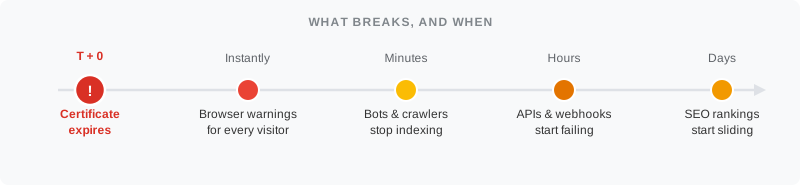
1. Every browser slams the door
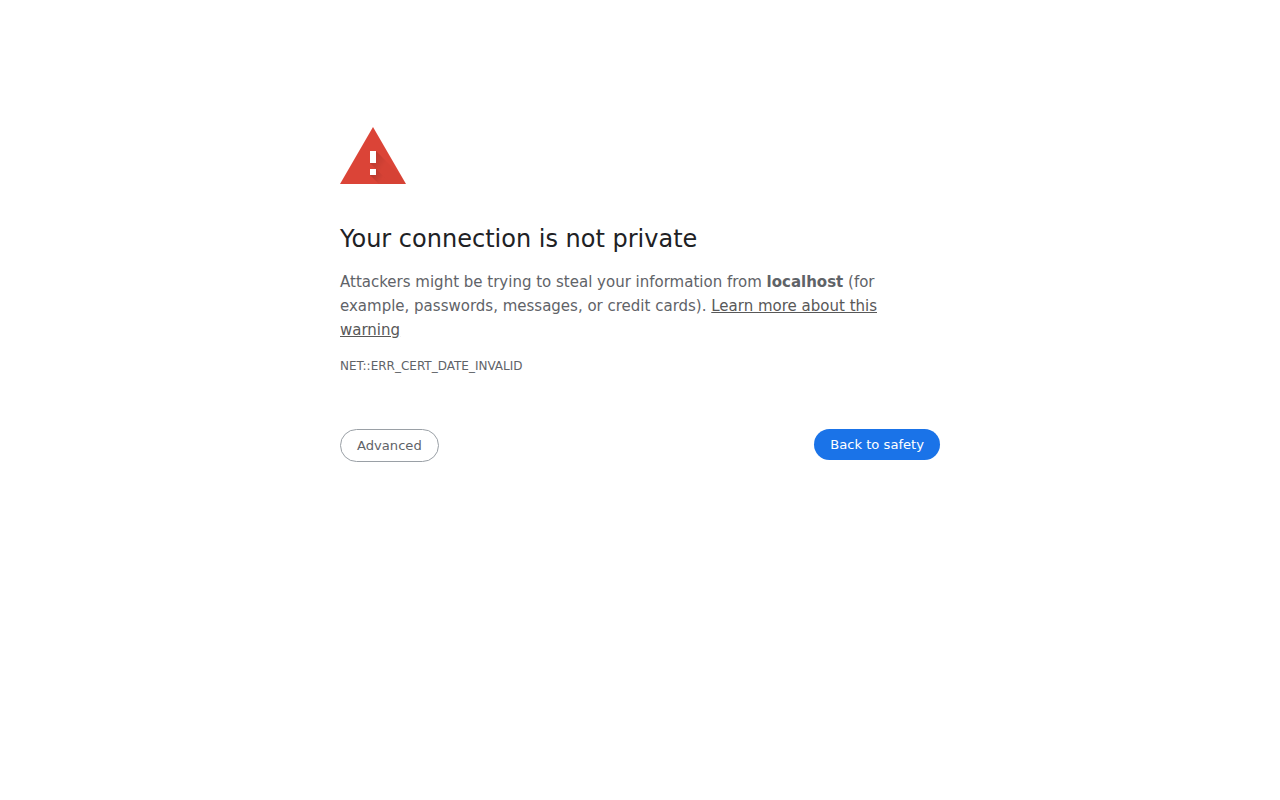
The first thing that happens is visible to anyone with a browser. Within seconds of the expiry timestamp, Chrome, Edge, Firefox, Safari and every other modern browser refuse to show your site without a warning.
You have probably seen it. Big shield. Red text. Your connection is not private. Underneath, in smaller type: NET::ERR_CERT_DATE_INVALID. There is a hidden “Advanced” button that lets a determined user click through, but most people don’t. They hit back. They go to a competitor.
A few things make this worse than people expect:
- HSTS makes the warning impossible to skip. If your site sends a
Strict-Transport-Securityheader (most do), Chrome will not show the bypass option. The warning is a hard stop. - Mobile browsers are stricter. On iOS Safari and Chrome for Android, the bypass UI is even more hidden, and users have less patience for fiddling.
- Embedded views show nothing useful. Webviews inside iOS, Android and Electron apps usually fail silently, so bug reports look like “the app is broken” rather than “your cert expired.”
So your homepage still loads, technically. The server is up. The HTML is being served. It just never reaches anyone.
2. Encryption stops, even for the people who click through
If a visitor does click “Advanced - Proceed anyway,” the connection is no longer encrypted in the way they assume it is. The TLS handshake completed against an untrusted certificate, so any data they submit (logins, card numbers, support tickets) is travelling over a connection that the browser itself flagged as insecure.
This is the part that bites compliance. PCI DSS, HIPAA, SOC 2 and the EU’s GDPR all assume your TLS is actually trusted. An expired cert that customers manually bypass is, on paper, a security incident.
3. APIs, webhooks and mobile apps break first
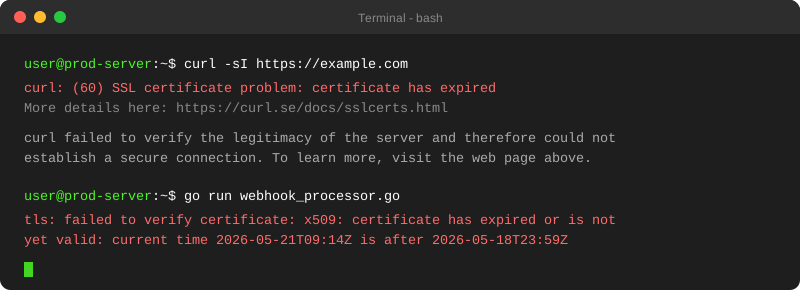
Real users see a warning. Machines see a certificate has expired error and walk away.
This is usually how teams find out. Not from monitoring, not from users. From another company’s webhook starting to fail. Stripe stops delivering events. Your Slack webhook returns a TLS error. A partner’s nightly job emails you to say their cron is throwing x509: certificate has expired or is not yet valid. Mobile apps that use certificate pinning won’t renegotiate - they refuse to launch.
In 2022, Spotify’s podcast platform Megaphone went dark for around eight hours because of a single expired certificate. Podcasts didn’t load, ad servers didn’t respond, dashboards went blank. All from one missed renewal.
4. Trust and revenue evaporate in minutes
For anything transactional - e-commerce, SaaS signup flows or paid content - the revenue impact starts almost immediately. The funnel from “saw the warning” to “left the site” is brutal.
A few things compound it. First-time visitors leave for good. Returning users might assume it’s a glitch, but people discovering you for the first time decide you’re either incompetent or a scam. Support gets buried with “is your site safe?” tickets. And customers who completed a purchase before the cert expired sometimes panic when they see the warning later and file a chargeback, assuming their card data was stolen.
LinkedIn has been on the wrong side of this twice. In 2017, a country subdomain certificate lapsed and millions of users couldn’t log in. In 2019, their link shortener lnkd.in failed the same way. Both fixes took hours, and neither was a technical problem. The renewal just didn’t happen.
5. The SEO damage is real (and lasts longer than you think)
Google has confirmed since 2014 that HTTPS is a ranking signal. That part is well known. What’s less obvious is what happens when the certificate behind that HTTPS goes bad.
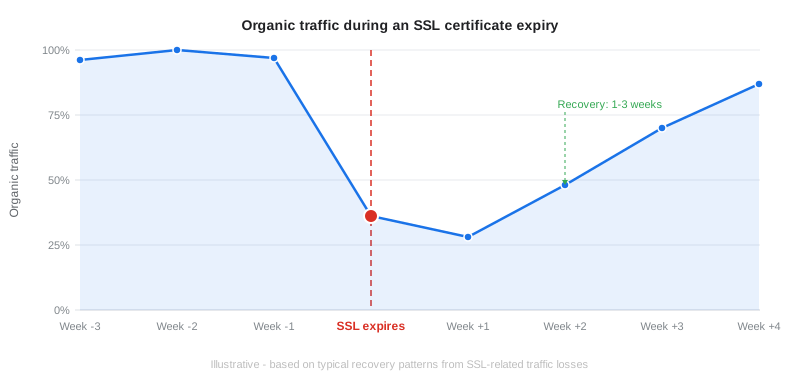
Two things hit your SEO at once. Googlebot stops crawling. When it encounters certificate errors, it treats them like any other browser would, so pages can fall out of fresh index coverage. Even a short window matters, because Googlebot doesn’t know if your “five-minute glitch” is actually a five-day expiration. User signals tank at the same time. The visitors who do find you bounce instantly, Chrome reports that data back to Google’s quality signals, and pages that were ranking well start sliding within days.
30-40%
organic traffic lost in the first week after an SSL expiry
typical SSL recovery patterns
Recovery typically takes one to three weeks after the fix, longer for competitive terms.
6. Real-world examples (yes, even at the top)
If you think this only happens to small teams without process, the receipts disagree.
It happens at the top too
The SSL hall of shame
Public incidents where a missed certificate renewal took down a major product. Not a process failure on the engineering side. A renewal that lived on no calendar.
-
Authentication certificate expired; users worldwide could not sign in. Microsoft confirmed the cause in their post-incident note.
Impact Global SSO outage
-
Shipped this incident twice. A country subdomain certificate lapsed in 2017; the link shortener lnkd.in lapsed in 2019.
Impact Login + shortener failure
-
Podcast hosting platform went dark over a single expired certificate. Podcasts did not load, ad servers stopped responding.
Impact Podcast platform dark
-
Ground station certificate expired. Elon Musk confirmed the cause publicly after a multi-hour outage.
Impact Ground station offline
-
A CDN certificate expired. Package installations broke for every Windows user trying to use the WinGet command-line tool.
Impact Package installs broke
-
A monitoring certificate sat expired for nineteen months, blinding the system that should have detected the 2017 breach. 147 million records stolen.
Impact Breach detection blinded
Worst case
The common thread: the renewal lived on one person's calendar, on no calendar at all, or on a certificate the central team did not know existed.
7. How to make sure you never see one
There is exactly one reliable way to avoid this: be told about the expiry well before it happens, on a channel you actually read.
That is what PingPing does. The moment you add a website, we check the SSL certificate every day (expiration date, certificate chain, domain match, trust status) and alert you 14, 7, 3 or 1 day before expiry, or on expiration day. Alerts go to email, Slack, Discord, SMS or webhooks.
Which threshold you pick matters more than it did last year. Certificates now top out at 200 days, so renewals come round twice as often. Our step-by-step guide to monitoring SSL certificate expiration covers the setup and which threshold suits which renewal method.
No separate SSL plan, no upcharge for the cert check, no toggle to enable. If you’re monitoring uptime, you’re monitoring the cert. See how that bundling compares to tools that charge extra for SSL checks.
For the full picture of what SSL monitoring actually checks and how the tools compare, see our complete guide to SSL certificate monitoring.
Start monitoring your SSL certificates
Checks every day. Alerts 14, 7, 3 or 1 day before expiry.
Related guides
SSL certificate monitoring: the complete guide
What SSL monitoring checks, why it matters, and how the tools compare.
What is uptime monitoring?
How 30-second checks catch outages before your users do.
How to monitor SSL certificate expiration
The hands-on tutorial: notification thresholds, common renewal failures, and what to check with openssl when something breaks.
FAQ
How long do I have once my SSL certificate expires?
Zero buffer. The certificate becomes invalid the second the expiry timestamp passes. Browsers, bots and APIs treat it as untrusted from that moment.
Does an expired SSL certificate take my site down?
The server keeps responding, but for almost every visitor and bot, the site is effectively down. Browsers refuse to show the page without a warning, APIs reject the connection, and mobile apps with pinning may refuse to connect at all.
Will Google penalize my site for an expired SSL?
There is no manual penalty, but the practical effect is a ranking drop. Googlebot stops crawling, users bounce, and quality signals fall. Sites with SSL errors commonly lose 30-40% of organic traffic within the first week and take one to three weeks to recover after a fix.
Can I just renew it after it expires?
Yes - you can issue and install a new certificate at any time. But the damage from the time it was expired (lost sessions, broken integrations, support tickets, SEO impact) doesn’t reverse. Catching it before expiry is the only outcome you actually want.
How early should I be notified about an expiring certificate?
Long enough to actually handle a problem. We default to 3 days, but most teams want 14 days for production-critical certs so they can absorb a holiday, a CA validation delay or an unrelated incident week. PingPing lets you set 14, 7, 3 or 1 day before expiry, or on expiration day.