SSL Certificate Monitoring: Catch Expiring Certs Before Your Users Do
TL;DR
SSL certificate monitoring automatically tracks your certificates’ expiration dates, chain validity, and security configuration - then alerts you before problems hit your users. PingPing checks your SSL certificates daily and notifies you via email, SMS, Slack, or webhooks when action is needed.
What is SSL Certificate Monitoring?
SSL certificate monitoring is a service that continuously tracks the health, validity, and security of your website’s SSL/TLS certificates. It ensures your digital certificates are properly configured, up-to-date, and providing the expected level of security for your users and applications.
SSL certificates are the foundation of website security and user trust. They encrypt data transmission, verify website identity, and provide visual trust indicators that users rely on when visiting your site. The moment your certificate expires, users will see a warning in their browser when visiting your site. Let’s try to prevent that from happening!
At PingPing, we check your SSL certificates every day, verifying multiple aspects of certificate health to prevent security issues and unexpected expirations. SSL Certificates are long lived, and they usually don’t change on a daily basis. So more frequent checking has no real benefit.
For an in-depth look at everything SSL monitoring covers, including tool comparisons, setup steps, and best practices, see our complete SSL certificate monitoring guide.
We will notify you when your certificate is about to expire, so you can renew it before it expires.
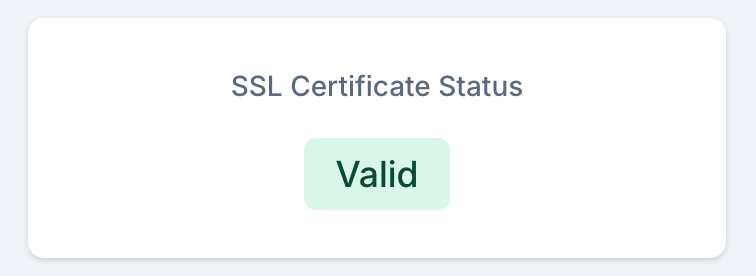
What Does PingPing’s SSL Monitor Check?
PingPing checks several aspects of your SSL certificate health every day:
- Certificate expiration date: You choose when to be notified - 14 days, 7 days, 3 days, or 1 day before expiry, or on expiration day. Plenty of time to renew.
- Certificate chain completeness: Missing intermediate certificates cause trust errors on some browsers and devices but not others - making them hard to catch manually.
- Domain name match: Verifies that your certificate covers the correct domains, including wildcard and SAN certificate validation.
- Protocol version: Flags deprecated TLS 1.0 and TLS 1.1 protocols that major browsers have already dropped support for.
- Certificate issuer: Detects unexpected certificate authority changes, which can be an indicator of compromise.
SSL certificates are long-lived and rarely change within a single day. Daily checks strike the right balance between catching issues early and avoiding unnecessary noise - unlike uptime monitoring where 30-second intervals matter, certificate status does not shift minute to minute.
How Does SSL Certificate Monitoring Work?
SSL certificate monitoring involves regular automated checks of your certificates’ configuration and status. The process begins with establishing a secure connection to your server, similar to what browsers do, and analyzing the complete certificate chain.
During each check, the monitoring system verifies multiple certificate properties: validity period, issuer authenticity, domain match, and cipher suite security. It also validates the certificate chain, ensuring all intermediate certificates are properly configured and trusted.
When issues are detected, such as approaching expiration dates or security vulnerabilities, the system immediately alerts administrators through configured notification channels, allowing for proactive certificate management.
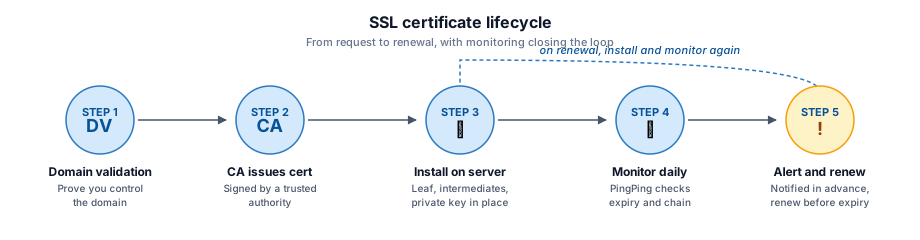
Why Does SSL Certificate Monitoring Matter?
SSL certificate issues can have severe consequences for your business and users. An expired or misconfigured certificate triggers browser warnings that can drive away visitors and damage your reputation. For e-commerce sites, this directly impacts revenue as users won’t trust entering payment information on an insecure site.
Modern browsers are increasingly strict about SSL security, showing prominent warnings for even minor certificate issues. These warnings can be particularly damaging to your brand, as they suggest your site is unsafe or untrustworthy.
Beyond user trust, proper SSL configuration matters for:
- Maintaining PCI DSS compliance for payment processing
- Protecting sensitive data transmission
- Preserving search engine rankings
- Ensuring API integrations continue functioning
- Meeting security compliance requirements
SSL Monitoring vs Uptime Monitoring
SSL certificate monitoring and uptime monitoring serve different purposes, but they complement each other well.
- Uptime monitoring checks whether your site responds at all - it verifies HTTP status codes, response times, and whether expected content is present. It runs every 30 seconds.
- SSL monitoring specifically validates your certificate health - expiration dates, chain validity, domain match, and protocol security. It runs daily because certificates do not change minute to minute.
A site can be “up” with a broken SSL certificate - visitors see a scary browser warning even though the server is responding. Conversely, a valid certificate does not help if the server is down. You need both checks to get the full picture.
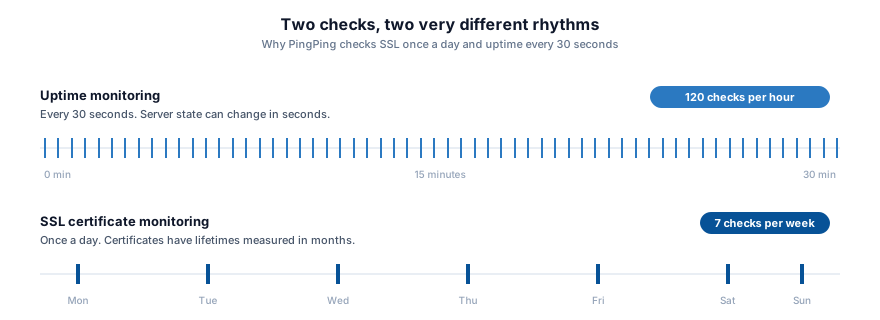
PingPing bundles both uptime monitoring and SSL certificate monitoring on every plan. You also get response time tracking and status pages included - no extra charges for SSL checks like some competitors require.
Common SSL Certificate Issues
Understanding common SSL issues helps prevent security vulnerabilities and downtime:
- Expired certificates: Browser shows “Your connection is not private” - visitors leave immediately. This is the most common and most preventable SSL issue.
- Missing intermediate certificates: Certificate appears untrusted on some devices and browsers but works fine on others. Notoriously difficult to debug without monitoring.
- Incorrect domain names: Triggers NET::ERR_CERT_COMMON_NAME_INVALID - breaks user trust and prevents access entirely.
- Weak cipher configurations: Makes your site vulnerable to known attacks. Modern browsers may refuse the connection altogether.
- Self-signed certificates in production: Every visitor sees a full-page security warning they must manually bypass. Search engines may stop indexing your site.
- Mixed content warnings: Even one HTTP resource on an HTTPS page triggers browser warnings and can break page functionality.
- Outdated protocol support: TLS 1.0 and 1.1 are deprecated. Sites still using them face connection failures on modern browsers.
- Certificate authority trust problems: If your CA is distrusted (as happened with Symantec, where Chrome and Firefox gradually removed trust over 2017-2018), all certificates it issued eventually become invalid.
Triage view
SSL problems fall into three patterns
Not every certificate issue looks the same to users. Grouping them by failure mode shows where monitoring earns its keep - especially the middle column, where you cannot reproduce the bug from your own machine.
Hard block
Browser refuses to render the page. Every visitor sees a full-screen warning.
-
Expired certificate
Validity period has ended. The most common and most preventable issue.
SignalNET::ERR_CERT_DATE_INVALID
-
Hostname mismatch
Certificate does not cover the domain typed. Common after migrations.
SignalNET::ERR_CERT_COMMON_NAME_INVALID
-
Distrusted CA
Issuing authority lost browser trust (Symantec, 2017-2018 is the textbook case).
SignalNET::ERR_CERT_AUTHORITY_INVALID
-
Self-signed cert
Server presents a certificate it issued to itself. No trusted root in the chain.
SignalNET::ERR_CERT_AUTHORITY_INVALID
Silent failure
Works for you, breaks for some users. The hardest class to catch without monitoring.
-
Missing intermediate
Leaf cert installed without intermediate chain. Trust path incomplete on some clients.
SignalFails on Android, corporate proxies, older devices
-
Mixed content
HTTPS page loads an HTTP image, script, or iframe. Page is no longer fully encrypted.
SignalPadlock removed, partial functionality broken
-
Weak cipher suite
Server negotiates an outdated cipher. Vulnerable to known attacks.
SignalModern browsers may downgrade or refuse connection
Gradual deprecation
Works today, breaks on a future browser update. The slow-motion problem.
-
TLS 1.0 / 1.1 support
Server still accepts deprecated protocols. Removed from all major browsers.
SignalERR_SSL_OBSOLETE_VERSION on connect
-
Aging cipher preferences
Server prefers ciphers that browsers will drop in future releases.
SignalSlow erosion of compatible clients
For a detailed walkthrough of what actually happens when an SSL certificate expires - browser warnings, API failures, SEO impact and real-world examples from Microsoft, LinkedIn and Spotify - see our dedicated guide.
How PingPing’s SSL Monitoring Helps
PingPing provides full SSL certificate monitoring through automated daily checks. You can configure when you want to be notified in your account settings. Our system examines multiple aspects of certificate health and security, so your websites maintain proper encryption and trust indicators.
When potential issues are detected, we notify you through your chosen channels: email, SMS, Slack, or other integrations. Our alerts include detailed information about the specific problem and recommended actions for resolution.
Key features of our SSL monitoring include:
- Advance expiration notifications
- Complete certificate chain validation
- Multi-domain certificate support
Unlike some monitoring tools that charge extra for SSL checks, PingPing includes SSL certificate monitoring on all plans. See how PingPing compares to Pingdom →
How to Set Up SSL Monitoring in PingPing
Getting started with SSL certificate monitoring takes less than a minute:
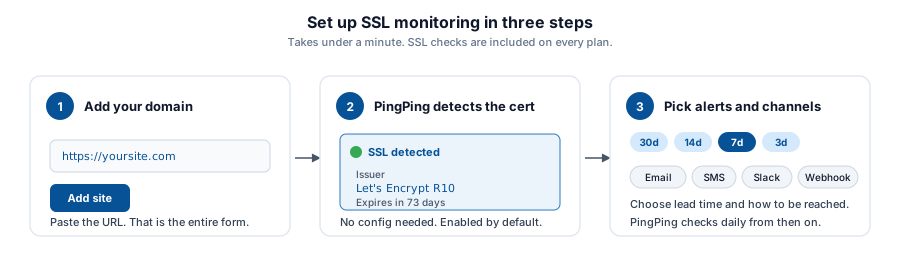
- Add your website URL in the dashboard. Just paste your domain - PingPing handles the rest.
- PingPing automatically detects and monitors your SSL certificate. No extra configuration needed. SSL monitoring is enabled by default on every plan.
- Configure your notification preferences. Choose when to be alerted - 14 days, 7 days, 3 days, or 1 day before expiry, or on expiration day. Pick your channels: email, SMS, Slack, or webhooks.
Never miss an expiry
That is it. PingPing checks your certificate daily and alerts you when anything needs attention.
Best Practices for Certificate Management
If you only do four things: keep a single list of every cert you own with its expiry and where it lives, send renewal alerts to at least two channels (so one missed email doesn’t take you down), automate renewal where you can (Let’s Encrypt + certbot or ACME on your load balancer), and write down the emergency-replacement steps before you need them. Most outages come from a cert you forgot existed on a subdomain nobody actively maintains.
Understanding Certificate Types
Different types of SSL certificates serve different purposes and provide varying levels of validation:
Domain Validated (DV) certificates offer basic encryption and are issued quickly after proving domain ownership. They’re suitable for basic websites and testing environments but provide minimal trust indicators to users.
Organization Validated (OV) certificates require verification of the organization’s identity, providing a higher level of trust. They’re appropriate for business websites and applications where user trust is important.
Extended Validation (EV) certificates undergo the most rigorous validation process. They used to trigger a green address bar in browsers, but major browsers removed that visual indicator in 2019. EV certs still verify organization identity, which matters for e-commerce and banking, but the visible trust difference for end users is gone.
Validation levels
Three levels of SSL certificate validation
All three deliver HTTPS and an identical padlock. They differ in how thoroughly the CA verifies you behind the scenes - which is what the cost and lead time pay for.
- DV
Domain Validated
Proves you control the domain, nothing else.
- What's verified
-
- Domain ownership
DNS or HTTP challenge
- Time to issue
- Minutes
Often fully automated
- Typical use case
-
Blogs, SaaS dashboards, APIs
Let's Encrypt, most managed platforms
- OV
Organization Validated
Proves your domain plus your registered business.
- What's verified
-
- Domain ownership
- Registered business name
Manual check of registry records
- Time to issue
- 1 to 3 days
Human review required
- Typical use case
-
Business websites, B2B portals
Most commercial CAs
- EV
Extended Validation
Strictest vetting. The original "green bar" tier.
- What's verified
-
- Domain ownership
- Legal entity verification
- Physical address audit
Multi-step audit per CA/Browser Forum rules
- Time to issue
- 1 to 2 weeks
Documents, phone callbacks, signed forms
- Typical use case
-
Banking, finance, payments
Specialist CAs with EV programmes
From a browser's perspective, all three deliver the same padlock and the same encryption strength. EV no longer triggers a green address bar (dropped in 2019).
Troubleshooting Certificate Issues
When something breaks, walk it in order. First, confirm the actual error in a fresh browser (private window, no cache) or via openssl s_client -connect yourdomain.com:443 -servername yourdomain.com so you’re debugging the real response, not a cached one. Most fixable problems fall into three buckets:
- Expired or near-expired certificate - renew via your CA or ACME client; reload the web server. PingPing will confirm the new expiry on the next daily check.
- Missing intermediate certificate - your fullchain file is incomplete. Concatenate the leaf cert with the CA’s intermediate bundle and reload. Some clients trust it without the intermediate; others don’t, which is why it shows as “works for me, broken for them.”
- Domain mismatch - the cert covers
example.combut notwww.example.com(or vice versa). Reissue with both names or a wildcard.
If none of these apply, run the URL through SSL Labs’ server test to spot configuration problems (deprecated TLS versions, weak ciphers, missing HSTS) without trial-and-erroring on production.
Start Monitoring Your SSL Certificates
Don’t wait for an expired certificate to take your site offline.
Start monitoring your SSL certificates
PingPing monitors your SSL certificates daily, checks your uptime every 30 seconds, and tracks response times - all included on every plan.
Related guides
What happens when your SSL certificate expires?
Browser warnings, API failures, SEO damage, and real-world examples from Microsoft, LinkedIn and Spotify.
SSL certificate monitoring guide
Tool comparisons, setup steps, and best practices for managing certificates at scale.
What is uptime monitoring?
How 30-second checks catch outages before your users do.