Uptime SLA Explained: 99.9% vs 99.99% vs 99.999%
TL;DR
An uptime SLA is a contractual availability commitment. 99.9% (three nines) = 44 minutes of allowed downtime per month; 99.99% (four nines) = 4.4 minutes. Each additional nine is roughly 10x harder to achieve. Breaches typically trigger service credits, not full refunds - know what your agreement actually says before you commit to a number.
What Is an Uptime SLA?
An uptime SLA (Service Level Agreement) is a formal commitment you make to your customers about how available your service will be. It is typically expressed as a percentage over a calendar month or year: “We guarantee 99.9% uptime.” That single number sets expectations, defines accountability, and often carries financial consequences when it is not met.
SLAs appear in hosting contracts, SaaS terms of service, enterprise agreements, and API documentation. They are the measurable promise behind phrases like “highly available” and “always on.” Without an SLA, those phrases are marketing. With one, they are contractual obligations.
The percentage in an SLA defines the maximum amount of downtime allowed in a given period before the provider is in breach. The difference between 99.9% and 99.99% looks trivial on paper, but it translates to a massive gap in real minutes of allowed downtime, and an even bigger gap in the engineering effort required to achieve it.
The Nines Table: What Each Level Means
Uptime SLAs are measured in “nines” (the number of nines after the decimal point). Each additional nine represents a 10x reduction in allowed downtime. Here is exactly what each level means in real time:
- 99% (two nines): 7 hours 18 minutes of downtime per month, or 3.65 days per year. This is barely acceptable for any production service. If your site can be down for over seven hours every month, you are not running a reliable service, you are running a hobby project.
- 99.5%: 3 hours 39 minutes of downtime per month, or 1.83 days per year. Common for smaller services and internal tools where occasional outages are tolerated. Still too loose for anything customer-facing.
- 99.9% (three nines): 43.8 minutes of downtime per month, or 8.76 hours per year. This is the standard target for most SaaS products and web applications. It is achievable with solid infrastructure and good operational practices, and it is what most customers expect as a baseline.
- 99.95%: 21.9 minutes of downtime per month, or 4.38 hours per year. A higher-tier SaaS target that signals serious commitment to reliability. Requires redundancy across most components and fast incident response.
- 99.99% (four nines): 4.38 minutes of downtime per month, or 52.6 minutes per year. Enterprise-grade availability. At this level, you cannot afford manual failover or slow alerting. Every component needs redundancy and automated recovery.
- 99.999% (five nines): 26.3 seconds of downtime per month, or 5.26 minutes per year. Mission-critical only - think payment processors, emergency services, and core cloud infrastructure. Achieving five nines requires massive investment in redundancy, automation, and geographic distribution.
Allowed downtime
The nines table
Each extra nine cuts your downtime budget by 10x and roughly 10x's the engineering cost to hit it.
- 99% Two ninesDowntime 7h 18mHobby and internal tools
- 99.5%Downtime 3h 39mSmall services where occasional outages are tolerated
- 99.9% Three ninesDowntime 43m 48sStandard SaaS baseline. What most customers expect.
- 99.95%Downtime 21m 54sHigher-tier SaaS commitment. Signals serious reliability.
- 99.99% Four ninesDowntime 4m 23sEnterprise grade. Automated recovery is mandatory.
- 99.999% Five ninesDowntime 26 secondsMission-critical only. Payment processors, emergency services.
Difficulty bars reflect relative engineering effort and infrastructure cost, not raw downtime. Five nines is roughly 1000x harder than two nines.
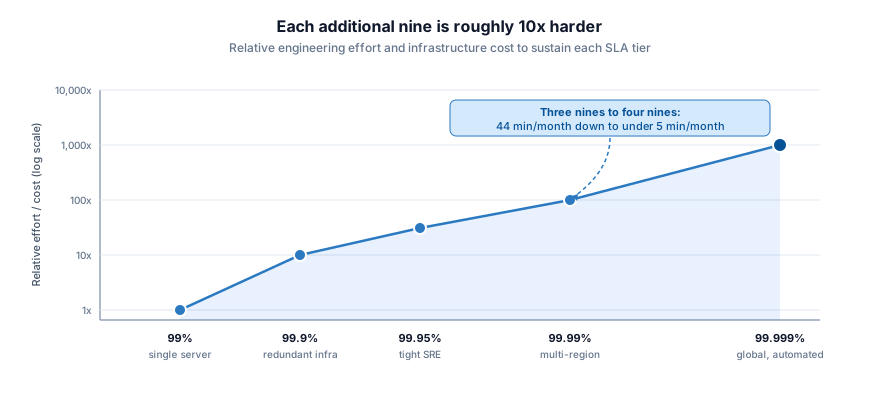
The jump between each level is not linear. Going from three nines to four nines means cutting your allowed downtime from 44 minutes per month to under 5 minutes. For a detailed breakdown of how uptime percentages translate to real time, see our guide on uptime and downtime.
Choosing the Right SLA Level
Not every service needs five nines. Pursuing an unrealistic SLA target wastes engineering resources and creates commitments you cannot keep. Ask yourself:
- What is the cost of downtime for your users? If your customers lose money or access to critical workflows when your service is unavailable, they expect a higher SLA. The real cost of downtime varies dramatically by business model: a payment gateway needs four or five nines, while an internal dashboard might be fine at three.
- What do competitors offer? Your SLA is a competitive differentiator. If every competitor in your space promises 99.9%, offering 99.95% or higher signals that you take reliability seriously. Falling below the industry standard puts you at a disadvantage.
- What can your infrastructure realistically deliver? Do not promise what you cannot sustain. If your current architecture cannot support four nines, committing to it in a contract creates liability. Audit your actual uptime history before setting a target.
A useful rule of thumb: each additional nine is roughly 10x harder and more expensive to achieve. Going from 99.9% to 99.99% does not mean a 10% improvement. It means a fundamental change in how you architect, deploy, and operate your systems. You need automated failover, multi-region redundancy, zero-downtime deployments, and monitoring that detects issues in seconds, not minutes.
What Happens When You Breach Your SLA
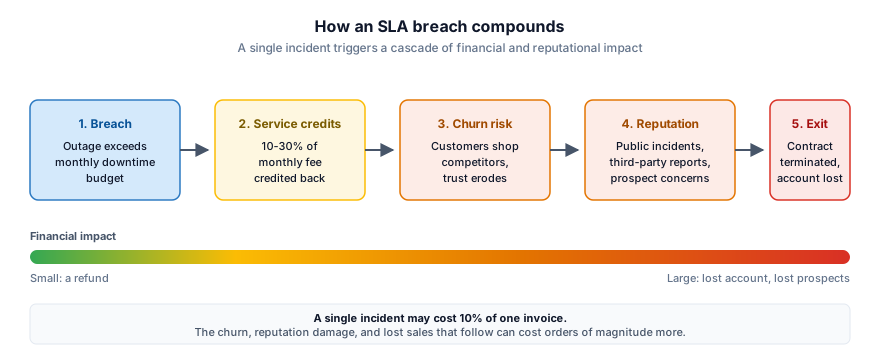
SLA breaches carry concrete consequences beyond embarrassment. The specifics depend on your agreement, but most breaches trigger one or more of the following:
- Service credits: The most common penalty. Customers receive a credit against their next invoice, typically 10% to 30% of their monthly fee per breach. Some SLAs tier the credits: 10% for missing 99.9%, 25% for missing 99.5%, and so on. Many SaaS companies issue these automatically.
- Customer churn: Credits compensate for the breach, but they do not restore trust. Repeated SLA violations push customers to evaluate competitors. Enterprise customers with strict compliance requirements may be contractually obligated to leave if you fail to meet agreed uptime levels.
- Reputation damage: Public outages generate negative attention. Status page incidents, social media complaints, and third-party monitoring reports create a public record of your reliability. Prospects research these before signing contracts.
- Contract termination: In enterprise agreements, severe or repeated SLA breaches can give customers the right to terminate their contract early without penalty. Losing a large account over a preventable outage is one of the most expensive mistakes a SaaS company can make.
The financial impact of SLA breaches compounds over time. A single incident might cost you 10% of one customer’s monthly fee. But the churn, reputation damage, and lost sales that follow can cost orders of magnitude more.
Planned vs Unplanned Downtime in SLAs
Not all downtime is treated equally in SLA calculations. Most SLAs draw a clear distinction between planned and unplanned downtime, and this distinction matters more than many teams realize.
Planned downtime includes scheduled maintenance windows, infrastructure migrations, and upgrades that are communicated to customers in advance. Most SLAs explicitly exclude planned maintenance from uptime calculations, provided the provider gives adequate notice (typically 24 to 72 hours).
Unplanned downtime is everything else: unexpected outages, crashes, failed deployments, network issues, and any disruption that was not communicated ahead of time. This is what counts against your SLA.
The boundary between “planned” and “unplanned” can get blurry. A maintenance window that runs over schedule becomes unplanned downtime. An emergency hotfix deployed without notice counts as unplanned even if the intent was to prevent a larger outage. Define these boundaries clearly in your SLA terms to avoid disputes.
Best practice: communicate all scheduled maintenance through a public status page. This creates a documented record that the downtime was planned, keeps customers informed, and reduces support ticket volume during the maintenance window. Transparency during planned maintenance builds far more trust than silent outages that customers have to discover on their own.
How Monitoring Frequency Affects SLA Compliance
Here is a scenario that catches many teams off guard: you are breaching your SLA and you do not even know it. The culprit is almost always monitoring frequency.
If your monitoring tool checks every 5 minutes, a 3-minute outage can slip between checks entirely undetected. It happened, your users experienced it, and it counts against your SLA, but your monitoring dashboard shows 100% uptime. You have no record of the incident, no alert was fired, and no postmortem was triggered.
This is especially dangerous at higher SLA tiers. A 99.99% SLA allows only 4.38 minutes of downtime per month. With 5-minute check intervals, a single missed outage could consume your entire monthly budget and you would never know it happened. Your SLA report looks clean while your customers experienced something very different.
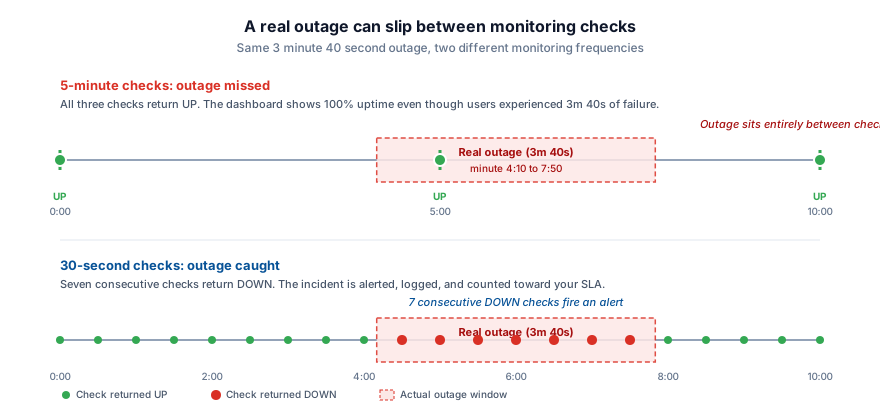
The solution is higher-frequency monitoring. With 30-second checks, the maximum undetected outage window drops to under a minute. Every incident gets captured, every alert fires promptly, and your uptime data accurately reflects what your users actually experienced.
For a deeper look at the detection gap, see why 5-minute uptime checks are not enough and our guide on 30-second monitoring. With 30-second checks, you get accurate uptime data that matches what your users actually experience.
Tracking and Reporting Your Uptime
Meeting your SLA is only half the job. You also need proof. When a customer disputes an outage, when a prospect asks for reliability data, or when your own team needs to evaluate infrastructure performance, you need accurate, verifiable uptime records.
Proper SLA tracking requires:
- Continuous external monitoring: Checks from outside your infrastructure at frequent intervals. Internal health checks are not enough. They miss DNS failures, certificate issues, and network problems that affect real users.
- Historical uptime data: Detailed logs of every check, every incident, and every recovery. This is your evidence trail for SLA compliance. Without granular data, disputes become he-said-she-said arguments.
- Public status page: A transparent, customer-facing view of your current and historical uptime. This reduces support load during incidents and demonstrates accountability to prospects evaluating your service.
PingPing provides all three. With uptime monitoring every 30 seconds from multiple global locations, you get accurate uptime statistics that reflect real user experience. Combined with built-in status pages and instant alerting, you have everything you need to track, prove, and maintain SLA compliance.
Never miss an expiry
See how PingPing compares to UptimeRobot and Pingdom for SLA-grade monitoring.
Related guides
What is uptime monitoring?
How 30-second checks catch outages before your users do and give you accurate data for SLA reporting.
What is uptime and downtime?
How uptime percentages translate to real minutes of downtime across different time periods.
Why 5-minute uptime checks aren't enough
How infrequent monitoring creates blind spots that hide SLA breaches from your own dashboards.