What Is Uptime and Downtime?
TL;DR
Uptime is the percentage of time your site is available and working. Downtime is everything else. The difference between 99% and 99.9% uptime sounds small but is the difference between 7 hours and 44 minutes of downtime per month. Unplanned downtime costs revenue, SEO rankings, and customer trust - and external monitoring is the only way to know it’s happening before your users tell you.
What Is Uptime?
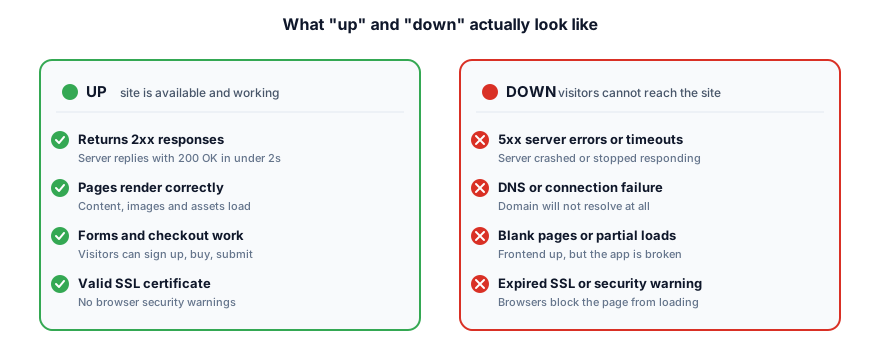
Uptime is the amount of time your website, application, or service is available and working correctly for users. When your site is “up,” visitors can load pages, submit forms, make purchases, and do everything they came to do without errors or interruptions.
Uptime is usually expressed as a percentage over a given period - typically a month or a year. A site with 99.9% uptime over the past month was accessible and functional for 99.9% of that time. The remaining 0.1% represents the minutes or hours it was unavailable.
For most online businesses, uptime is the single most important reliability metric. It does not matter how fast your site loads or how polished the design is if visitors cannot reach it at all. Every minute of lost availability is a minute your business is invisible to the world.
What Is Downtime?
Downtime is the inverse of uptime. It’s the period during which your website or service is unavailable to users. When your site is “down,” visitors see error pages, timeouts, or simply cannot connect. From their perspective, your business does not exist during that window.
Downtime comes in two forms:
- Planned downtime: Scheduled maintenance windows, database migrations, or infrastructure upgrades. You control the timing and can warn users in advance.
- Unplanned downtime: Server crashes, network failures, botched deployments, or DDoS attacks. These hit without warning and are far more damaging to trust and revenue.
Both types affect users, but unplanned downtime is what keeps founders and engineering teams up at night. The faster you detect it, the faster you can respond. Which is why uptime monitoring exists.
Uptime Percentage: What the Numbers Actually Mean
Uptime percentages look impressive until you convert them into real time. The difference between 99% and 99.99% sounds small, but it translates to hours versus minutes of downtime. Here is what each level actually costs you:
- 99% uptime: 7.31 hours of downtime per month (87.6 hours per year)
- 99.5% uptime: 3.65 hours of downtime per month (43.8 hours per year)
- 99.9% uptime: 43.8 minutes of downtime per month (8.76 hours per year)
- 99.95% uptime: 21.9 minutes of downtime per month (4.38 hours per year)
- 99.99% uptime: 4.38 minutes of downtime per month (52.6 minutes per year)
- 99.999% uptime: 26.3 seconds of downtime per month (5.26 minutes per year)
Allowed downtime
The nines table
Each extra nine cuts your downtime budget by 10x and roughly 10x's the engineering cost to hit it.
- 99% Two ninesDowntime 7h 18mHobby and internal tools
- 99.5%Downtime 3h 39mSmall services where occasional outages are tolerated
- 99.9% Three ninesDowntime 43m 48sStandard SaaS baseline. What most customers expect.
- 99.95%Downtime 21m 54sHigher-tier SaaS commitment. Signals serious reliability.
- 99.99% Four ninesDowntime 4m 23sEnterprise grade. Automated recovery is mandatory.
- 99.999% Five ninesDowntime 26 secondsMission-critical only. Payment processors, emergency services.
Difficulty bars reflect relative engineering effort and infrastructure cost, not raw downtime. Five nines is roughly 1000x harder than two nines.
Look at the jump from 99.9% to 99.99%. That single extra nine cuts your allowed downtime from nearly 44 minutes per month to just over 4 minutes. Achieving each additional nine of availability requires exponentially more engineering effort, redundancy, and investment.
Most hosting providers and SaaS platforms promise an uptime percentage in their service level agreement. If you are evaluating providers or setting your own targets, our guide to uptime SLAs breaks down what these commitments actually guarantee and what happens when they are not met.
Common Causes of Downtime
Downtime rarely has a single root cause. Understanding the most common triggers helps you build more resilient systems and respond faster when something breaks:
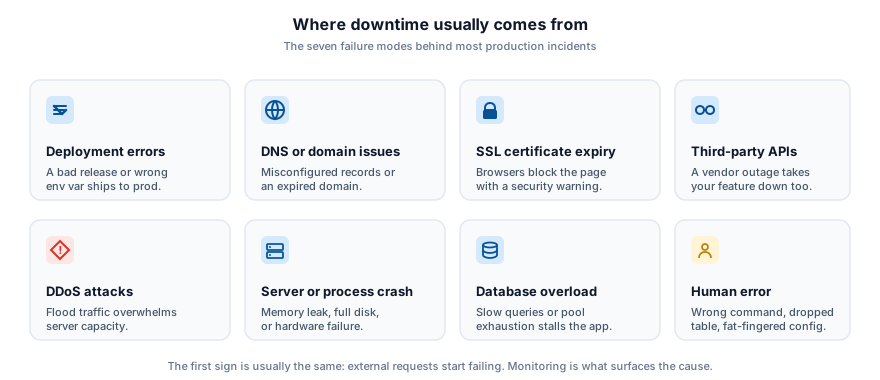
- Server hardware or software failures: Disks fill up, memory leaks accumulate, or processes crash unexpectedly.
- Deployment errors: A bad code release or misconfigured environment variable can take a site down instantly.
- DNS issues: Misconfigured DNS records, expired domains, or DNS provider outages make your site unreachable even when servers are healthy.
- DDoS attacks: Distributed denial-of-service attacks flood your server with traffic, overwhelming its capacity.
- SSL/TLS certificate expiration: An expired certificate triggers browser warnings that effectively block all visitors.
- Third-party dependency failures: Your site may depend on external APIs, payment gateways, or CDN providers that go down on their own.
- Database overload: Slow queries, connection pool exhaustion, or replication lag can bring an application to a halt.
Why Uptime Matters for Your Business
Uptime is not just a technical metric. It directly impacts your bottom line and your reputation. Here is what is at stake when your site goes down:
- Revenue loss: Every minute of downtime is a minute where customers cannot buy, sign up, or convert. For e-commerce sites, the cost of downtime adds up fast.
- SEO impact: Search engines penalize sites that are frequently unavailable. Repeated downtime can hurt your rankings and reduce organic traffic over time.
- Customer trust: Users who encounter errors lose confidence in your product. If your marketing site is down, prospects wonder whether your actual service is reliable.
- SLA compliance: If you have committed to uptime guarantees with your own customers, failing to meet them can trigger credits, refunds, or contract penalties.
For solo founders and small teams, downtime hits even harder. You may not have a dedicated ops team watching dashboards around the clock, which makes automated monitoring and instant alerts essential. Our guide on website monitoring for solo founders covers practical strategies for staying on top of reliability without a large team.
How to Measure and Monitor Uptime
Tracking uptime requires external monitoring, a service that checks your site from outside your own infrastructure at regular intervals. This is the only way to know whether real users can actually reach you.
Server-side monitoring (checking CPU, memory, or process health from within the server) is useful but not sufficient. Your server may report everything as healthy while a DNS misconfiguration, an expired certificate, or a network issue makes the site unreachable from the outside. External monitoring catches what internal checks miss.
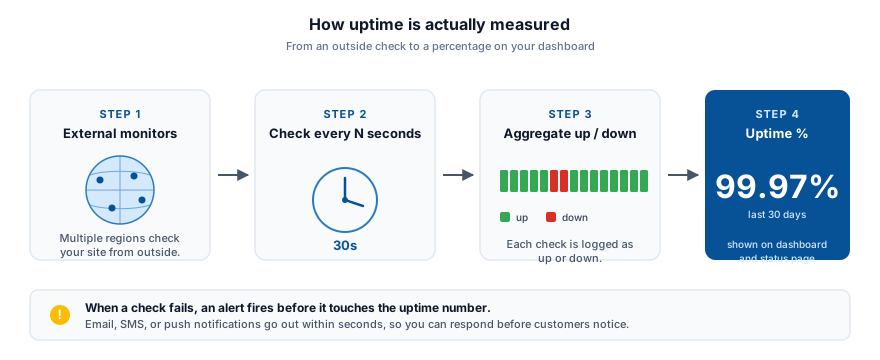
The frequency of checks matters too. If your monitoring tool only checks every five minutes, you could be down for nearly five minutes before anyone knows. That is why PingPing runs 30-second uptime checks, so you find out about problems in seconds, not minutes. For a deeper look at why check frequency matters, see why 5-minute uptime checks are not enough.
A good uptime monitoring setup should include checks from multiple geographic locations, instant alerts via email or SMS, and a public status page so your users can check availability on their own. For inspiration, see real-world status page examples from companies like GitHub and Stripe.
See how PingPing’s monitoring compares to UptimeRobot and Pingdom.
Related guides
What is uptime monitoring?
How external checks, alert routing, and check frequency combine to catch outages before your users do.
What is 30-second monitoring?
Why check frequency is the single biggest variable in how quickly you detect downtime.
The cost of website downtime
Revenue, SEO, and trust - the real price of every minute your site is unavailable.